Build a custom Javascript linter in 5 minutes
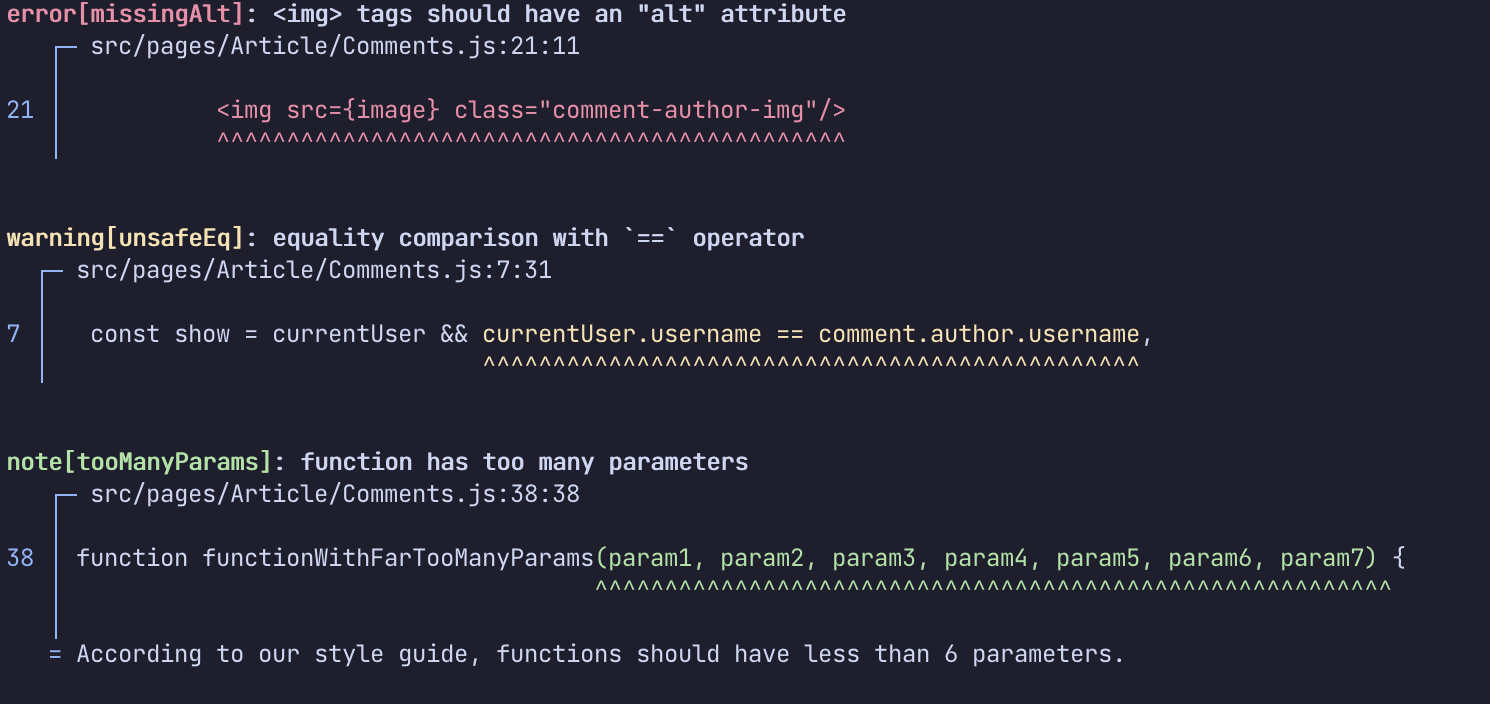
Creating a custom linter can be a great way to enforce coding standards and detect code smells. In this tutorial, we'll use Sylver, a source code query engine to build a custom Javascript linter in just a few lines of code.
Sylver's main interface is a REPL console, in which we can load the source code of our project to query it using a SQL-like query language called SYLQ. Once we'll have authored SYLQ queries expressing our linting rules, we'll be able to save them into a ruleset that can be run like a traditional linter.
Installation
If sylver --version doesn't output a version number >= 0.1.9, go to https://sylver.dev to download a fresh copy of the software.
Starting the REPL
Starting the REPL is as simple as invoking the following command at the root of your project:
sylver query --files="src/**/*.js" --spec=https://github.com/sylver-dev/javascript.git#javascript.yaml
The REPL can be exited by pressing Ctrl+C or typing :quit at the prompt.
We can now execute SYLQ queries by typing the code of the query, followed by a ;.
For instance: to retrieve all the method definitions (denoted by the node type MethodDefinition):
match MethodDefinition;
The results of the query will be formatted as follow:
[...]
$0 [MethodDefinition src/store/createArticles.js:36:5-38:5]
$1 [MethodDefinition src/store/createArticles.js:39:5-41:5]
$2 [MethodDefinition src/store/createArticles.js:42:5-59:5]
$3 [MethodDefinition src/store/createArticles.js:60:5-77:5]
$4 [MethodDefinition src/store/createArticles.js:78:5-83:5]
$5 [MethodDefinition src/store/createArticles.js:84:5-89:5]
[...]
The code of a given method definition can be displayed by typing :print followed by the node alias (for instance: :print $3). The parse tree can be displayed using the :print_ast command (for instance: :print_ast $3).
Rule1: use of the == operator
For our first rule, we'd like to detect uses of the unsafe == operator for checking equality.
The first step is to get familiar with the tree structure of Javascript's binary expressions, so let's print a BinaryExpression node along with its AST:
λ> match BinaryExpression;

[...]
$43 [BinaryExpression src/pages/Article/Comments.js:7:31-7:77]
[...]

λ> :print $43

currentUser.username == comment.author.username

λ> :print_ast $43

BinaryExpression {
. ● left: MemberExpression {
. . ● object: Identifier { currentUser }
. . ● property: Identifier { username }
. }
. ● operator: EqEq { == }
. ● right: MemberExpression {
. . ● object: MemberExpression {
. . . ● object: Identifier { comment }
. . . ● property: Identifier { author }
. . }
. . ● property: Identifier { username }
. }
}
It appears that the nodes violating our rule are the BinaryExpression nodes
for which the operator field contains an EqEq node.
This can be easily expressed in SYLQ:
match BinaryExpression(operator: EqEq);
Rule2: functions with too many parameters
For our second linting rule, we'd like to identify functions that have more than 6 parameters.
Here is the relevant part of the parse tree of a Function node:
Function {
. ● async: AsyncModifier { async }
. ● name: Identifier { send }
. ● parameters: FormalParameters {
. . ● params: List {
. . . FormalParameter {
. . . . ● value: Identifier { method }
. . . }
. . . FormalParameter {
. . . . ● value: Identifier { url }
. . . }
. . . FormalParameter {
. . . . ● value: Identifier { data }
. . . }
. . . FormalParameter {
. . . . ● value: Identifier { resKey }
. . . }
. . }
. }
. ● body: StatementBlock {
[...]
Function parameters are represented by FormalParameters nodes with a params field containing the actual function parameters. In our query, the condition
regarding the length of the params list can be specified in a when clause, as follows:
match f@FormalParameters when f.params.length > 6;
Rule3: JSX 'img' elements without an 'alt' attribute
For our last rule, we'd like to identify <img> elements that miss the alt attribute. img elements are self-closing, so we'll start by looking at the parse tree of a JsxSelfClosingElement node:
λ> match JsxSelfClosingElement;
[...]
$73 [JsxSelfClosingElement src/pages/Article/Comments.js:21:11-21:55]
[...]

λ> :print $73

<img src={image} class="comment-author-img"/>

λ> :print_ast $73

JsxSelfClosingElement {
. ● name: Identifier { img }
. ● attribute: List {
. . JsxAttribute {
. . . ● name: Identifier { src }
. . . ● value: JsxExpression {
. . . . Identifier { image }
. . . }
. . }
. . JsxAttribute {
. . . ● name: Identifier { class }
. . . ● value: String { "comment-author-img" }
. . }
. }
}
In order to find the img elements that have no JsxAttribute with named alt in their attribute list, we can use a list quantifying expression, as illustrated in the following query:
match j@JsxSelfClosingElement(name: "img")
      when no j.attribute match JsxAttribute(name: "alt");
Creating the ruleset
The following ruleset uses our linting rules:
id: customLinter

language: "https://github.com/sylver-dev/javascript.git#javascript.yaml"

rules:
    - id: unsafeEq
      message: equality comparison with `==` operator
      category: style

      query: "match BinaryExpression(operator: EqEq)"


    - id: tooManyParams
      message: function has too many parameters
      category: style
      note: According to our style guide, functions should have less than 6 parameters.

      query: match f@FormalParameters when f.params.length > 6


    - id: missingAlt
      message: <img> tags should have an "alt" attribute
      category: style

      query:
        "match j@JsxSelfClosingElement(name: 'img')
              when no j.attribute match JsxAttribute(name: 'alt')"
Assuming that it is stored in a file called custom_linter.yaml at the root of our project, we can run it with the following command:
sylver ruleset run --files="src/**/*.js" --rulesets=custom_linter.yaml
Getting updates
For more informations about new features and/or cool SYLQ one-liners, connect with Sylver on Twitter or Discord!
Comments
Join the discussionNo comments yet. Be the first to comment.


