Build your own SQLite, Part 1: Listing tables
As developers, we use databases all the time. But how do they work? In this series, we'll try to answer that question by building our own SQLite-compatible database from scratch.
Source code examples will be provided in Rust, but you are encouraged to follow along using your language of choice, as we won't be relying on many language-specific features or libraries.
As an introduction, we'll implement the simplest version of the tables command,
which lists the names of all the tables in a database. While this looks simple, we'll
see that it requires us to make our first deep dive into the SQLite file format.
Building the test database
To keep things as simple as possible, let's build a minimalistic test database:
sqlite3 minimal_test.db
sqlite> create table table1(id integer);
sqlite> create table table2(id integer);
sqlite> .exit
This creates a database with two tables, table1 and table2, each with a single
column, id. We can verify this by running the tables command in the SQLite shell:
sqlite3 minimal_test.db
sqlite> .tables
table1  table2
sqlite> .exit
Bootstrapping the project
Let's start by creating a new Rust project. We'll use the cargo add to add our only dependency
for now, anyhow:
cargo new rsqlite
cd rsqlite
cargo add anyhow
The SQLite file format
SQLite databases are stored in a single file, the format of which is
documented in the SQLite File Format Specification.
The file is divided into pages, with each page having the same size: a power of 2, between
512 and 65536 bytes.
The first 100 bytes of the first page contain the database header, which includes
information such as the page size and the file format version. In this first part, we'll only
be interested in the page size.
Pages can be of different types, but for this first article, we'll only be interested in
table btree leaf pages, which store the actual table data.
Our first task will be to implement a Pager struct that reads and caches pages from the
database file. But before we do, we'll have to read the page size from the database header.
Let's start by defining our Header struct:
// src/page.rs
#[derive(Debug, Copy, Clone)]
pub struct DbHeader {
    pub page_size: u32,
}
The header starts with the magic string SQLite format 3\0, followed by the page size
encoded as a big-endian 2-byte integer at offset 16. With this information, we can
implement a function that reads the header from a buffer:
// src/pager.rs
pub const HEADER_SIZE: usize = 100;
const HEADER_PREFIX: &[u8] = b"SQLite format 3\0";
const HEADER_PAGE_SIZE_OFFSET: usize = 16;

const PAGE_MAX_SIZE: u32 = 65536;

pub fn parse_header(buffer: &[u8]) -> anyhow::Result<page::DbHeader> {
    if !buffer.starts_with(HEADER_PREFIX) {
        let prefix = String::from_utf8_lossy(&buffer[..HEADER_PREFIX.len()]);
        anyhow::bail!("invalid header prefix: {prefix}");
    }

    let page_size_raw = read_be_word_at(buffer, HEADER_PAGE_SIZE_OFFSET);
    let page_size = match page_size_raw {
        1 => PAGE_MAX_SIZE,
        n if ((n & (n - 1)) == 0) && n != 0 => n as u32,
        _ => anyhow::bail!("page size is not a power of 2: {}", page_size_raw),
    };

    Ok(page::Header { page_size })
}

fn read_be_word_at(input: &[u8], offset: usize) -> u16 {
    u16::from_be_bytes(input[offset..offset + 2].try_into().unwrap())
}
Two things to note here:
- As the maximum page size cannot be represented as a 2-byte integer, a page size of 1 is use to represent the maximum page size.
- We use a somewhat convoluted expression to check if the page size is a power of 2.
The expression
n & (n - 1) == 0is true if and only ifnis a power of 2, except forn = 0.
Decoding Table B-tree leaf pages
Now that we have the minimum information we need to read pages from the disk, let's explore
the content of a table btree-leaf page.
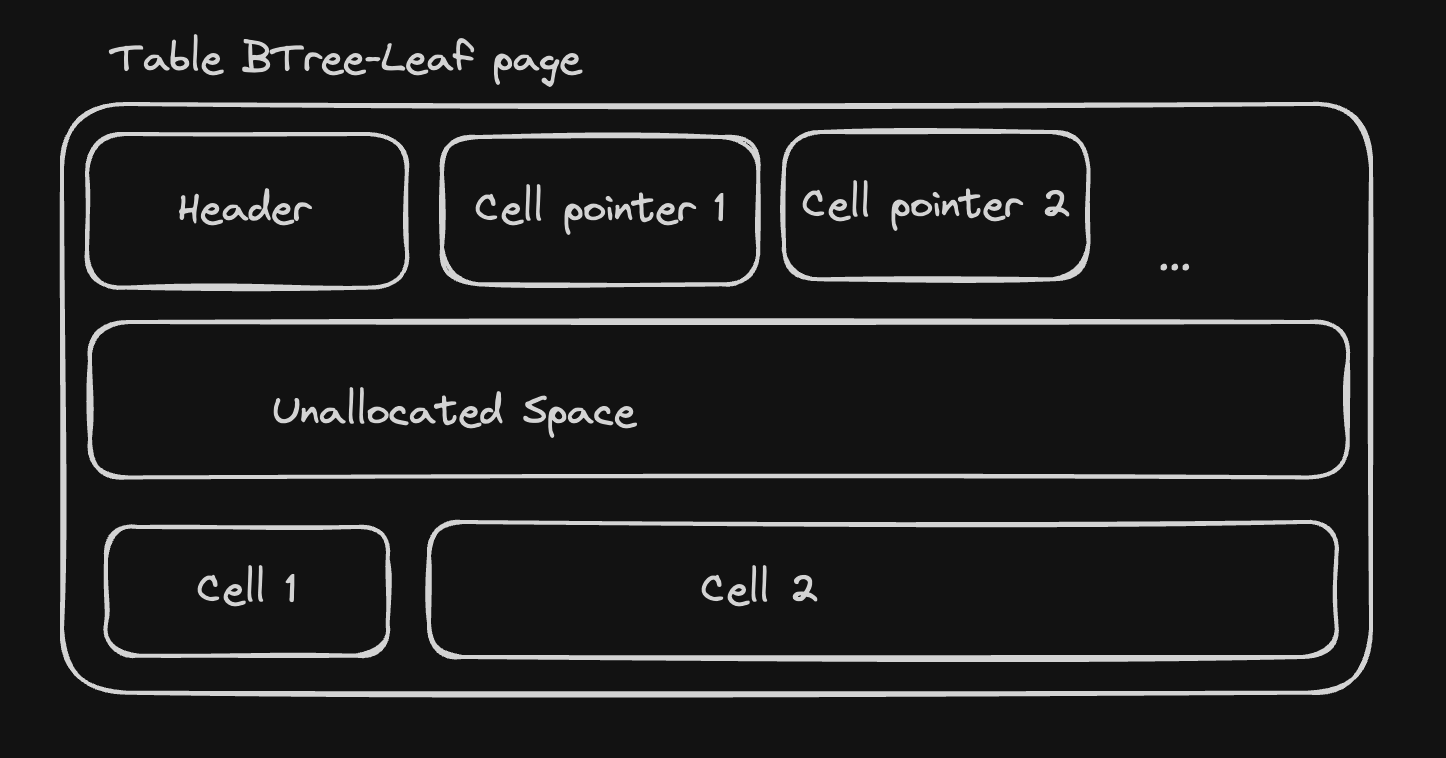
table btree-leaf pages start with an 8-byte header, followed by an sequence of "cell pointers"
containing the offset of every cell in the page. The cells contain the table data, and we
can think of them as key-value pairs, where the key is a 64-bits integer encoded as
a varint
(the rowid) and the value is an arbitrary sequence of bytes representing the row data.
The header contains the following fields:
page_type: byte representing the page type. Fortable btree-leafpages, this is 0x0D.first_freeblock: 2-byte integer representing the offset of the first free block in the page, or zero if there is no freeblock.cell_count: 2-byte integer representing the number of cells in the page.cell_content_offset: 2-byte integer representing the offset of the first cell.fragmented_bytes_count: 1-byte integer representing the number of fragmented free bytes in the page (we won't make use of it for now).
We'll start by defining a Page enum representing a parsed page, along with
the necessary structs to represent the page header and the cell pointers:
#[derive(Debug, Clone)]
pub enum Page {
    TableLeaf(TableLeafPage),
}

#[derive(Debug, Clone)]
pub struct TableLeafPage {
    pub header: PageHeader,
    pub cell_pointers: Vec<u16>,
    pub cells: Vec<TableLeafCell>,
}

#[derive(Debug, Copy, Clone)]
pub struct PageHeader {
    pub page_type: PageType,
    pub first_freeblock: u16,
    pub cell_count: u16,
    pub cell_content_offset: u32,
    pub fragmented_bytes_count: u8,
}

#[derive(Debug, Copy, Clone)]
pub enum PageType {
    TableLeaf,
}

#[derive(Debug, Clone)]
pub struct TableLeafCell {
    pub size: i64,
    pub row_id: i64,
    pub payload: Vec<u8>,
}
The corresponding parsing functions are quite straightforward. Note the offset handling
in parse_page: since the first page contains the database header, we start parsing
the page at offset 100.
/// pager.rs
const PAGE_LEAF_HEADER_SIZE: usize = 8;
const PAGE_FIRST_FREEBLOCK_OFFSET: usize = 1;
const PAGE_CELL_COUNT_OFFSET: usize = 3;
const PAGE_CELL_CONTENT_OFFSET: usize = 5;
const PAGE_FRAGMENTED_BYTES_COUNT_OFFSET: usize = 7;

fn parse_page(buffer: &[u8], page_num: usize) -> anyhow::Result<page::Page> {
    let ptr_offset = if page_num == 1 { HEADER_SIZE as u16 } else { 0 };

    match buffer[0] {
        PAGE_LEAF_TABLE_ID => parse_table_leaf_page(buffer, ptr_offset),
        _ => Err(anyhow::anyhow!("unknown page type: {}", buffer[0])),
    }
}

fn parse_table_leaf_page(buffer: &[u8], ptr_offset: u16) -> anyhow::Result<page::Page> {
    let header = parse_page_header(buffer)?;

    let content_buffer = &buffer[PAGE_LEAF_HEADER_SIZE..];
    let cell_pointers = parse_cell_pointers(content_buffer, header.cell_count as usize, ptr_offset);

    let cells = cell_pointers
        .iter()
        .map(|&ptr| parse_table_leaf_cell(&buffer[ptr as usize..]))
        .collect::<anyhow::Result<Vec<page::TableLeafCell>>>()?;

    Ok(page::Page::TableLeaf(page::TableLeafPage {
        header,
        cell_pointers,
        cells,
    }))
}


fn parse_page_header(buffer: &[u8]) -> anyhow::Result<page::PageHeader> {
    let page_type = match buffer[0] {
        0x0d => page::PageType::TableLeaf,
        _ => anyhow::bail!("unknown page type: {}", buffer[0]),
    };

    let first_freeblock = read_be_word_at(buffer, PAGE_FIRST_FREEBLOCK_OFFSET);
    let cell_count = read_be_word_at(buffer, PAGE_CELL_COUNT_OFFSET);
    let cell_content_offset = match read_be_word_at(buffer, PAGE_CELL_CONTENT_OFFSET) {
        0 => 65536,
        n => n as u32,
    };
    let fragmented_bytes_count = buffer[PAGE_FRAGMENTED_BYTES_COUNT_OFFSET];

    Ok(page::PageHeader {
        page_type,
        first_freeblock,
        cell_count,
        cell_content_offset,
        fragmented_bytes_count,
    })
}


fn parse_cell_pointers(buffer: &[u8], n: usize, ptr_offset: u16) -> Vec<u16> {
    let mut pointers = Vec::with_capacity(n);
    for i in 0..n {
        pointers.push(read_be_word_at(buffer, 2 * i) - ptr_offset);
    }
    pointers
}

fn parse_table_leaf_cell(mut buffer: &[u8]) -> anyhow::Result<page::TableLeafCell> {
    let (n, size) = read_varint_at(buffer, 0);
    buffer = &buffer[n as usize..];

    let (n, row_id) = read_varint_at(buffer, 0);
    buffer = &buffer[n as usize..];

    let payload = buffer[..size as usize].to_vec();

    Ok(page::TableLeafCell {
        size,
        row_id,
        payload,
    })
}

pub fn read_varint_at(buffer: &[u8], mut offset: usize) -> (u8, i64) {
    let mut size = 0;
    let mut result = 0;

    while size < 9 {
        let current_byte = buffer[offset] as i64;
        if size == 8 {
            result = (result << 8) | current_byte;
        } else {
            result = (result << 7) | (current_byte & 0b0111_1111);
        }

        offset += 1;
        size += 1;

        if current_byte & 0b1000_0000 == 0 {
            break;
        }
    }

    (size, result)
}
To read a varint, we copy the 7 least significant bits of each byte to the result, as long as the most significant bit is set. As the maximum length of a varint is 9 bytes, keep track of
the number of bytes visited and stop after a maximum of 9 bytes. Note that to
complete a 64 bits value, we need the first 7 bits of the first 8 bytes
and all the bits of the last byte. That's why we test the current size
of the varint at each iteration and add a special case for the last byte (when size == 8).
We can finally implement the pager itself. For now, it only loads and caches pages without any eviction policy:
// pager.rs
#[derive(Debug, Clone)]
pub struct Pager<I: Read + Seek = std::fs::File> {
    input: I,
    page_size: usize,
    pages: HashMap<usize, page::Page>,
}

impl<I: Read + Seek> Pager<I> {
    pub fn new(input: I, page_size: usize) -> Self {
        Self {
            input,
            page_size,
            pages: HashMap::new(),
        }
    }

    pub fn read_page(&mut self, n: usize) -> anyhow::Result<&page::Page> {
        if self.pages.contains_key(&n) {
            return Ok(self.pages.get(&n).unwrap());
        }

        let page = self.load_page(n)?;
        self.pages.insert(n, page);
        Ok(self.pages.get(&n).unwrap())
    }

    fn load_page(&mut self, n: usize) -> anyhow::Result<page::Page> {
        let offset = n.saturating_sub(1) * self.page_size;

        self.input
            .seek(SeekFrom::Start(offset as u64))
            .context("seek to page start")?;

        let mut buffer = vec![0; self.page_size];
        self.input.read_exact(&mut buffer).context("read page")?;

        parse_page(&buffer, n)
    }
}
Records
We now have a way to read pages, and to access the pages cells. But how to decode the values of the cells? Each cell contains the value of a row in the table, encoded using the SQLite record format. The record format is quite simple: a record consists of a header, followed by a sequence of field values. The header starts with a varint representing the byte size of the headerm followed by a sequence of varints -one per column- determining the type of each column according to the following table:
- 0: NULL
- 1: 8-bits signed integer
- 2: 16-bits signed integer
- 3: 24-bits signed integer
- 4: 32-bits signed integer
- 5: 48-bits signed integer
- 6: 64-bits signed integer
- 7: 64-bits IEEE floating point number
- 8: value is the integer 0
- 9: value is the integer 1
- 10 & 11: reserved for internal use
- n with n even and n > 12: BLOB of size (n - 12) / 2
- n with n odd and n > 13: text of size (n - 13) / 2
We now have all the informations we need to parse and represent record's headers:
// src/cursor.rs
#[derive(Debug, Copy, Clone)]
pub enum RecordFieldType {
    Null,
    I8,
    I16,
    I24,
    I32,
    I48,
    I64,
    Float,
    Zero,
    One,
    String,
    Blob,
}

#[derive(Debug, Clone)]
pub struct RecordField {
    pub offset: usize,
    pub field_type: RecordFieldType,
}

#[derive(Debug, Clone)]
pub struct RecordHeader {
    pub fields: Vec<RecordField>,
}

fn parse_record_header(mut buffer: &[u8]) -> anyhow::Result<RecordHeader> {
    let (varint_size, header_length) = crate::pager::read_varint_at(buffer, 0);
    buffer = &buffer[varint_size as usize..header_length as usize];

    let mut fields = Vec::new();
    let mut current_offset = header_length as usize;

    while !buffer.is_empty() {
        let (discriminant_size, discriminant) = crate::pager::read_varint_at(buffer, 0);
        buffer = &buffer[discriminant_size as usize..];

        let (field_type, field_size) = match discriminant {
            0 => (RecordFieldType::Null, 0),
            1 => (RecordFieldType::I8, 1),
            2 => (RecordFieldType::I16, 2),
            3 => (RecordFieldType::I24, 3),
            4 => (RecordFieldType::I32, 4),
            5 => (RecordFieldType::I48, 6),
            6 => (RecordFieldType::I64, 8),
            7 => (RecordFieldType::Float, 8),
            8 => (RecordFieldType::Zero, 0),
            9 => (RecordFieldType::One, 0),
            n if n >= 12 && n % 2 == 0 => {
                let size = ((n - 12) / 2) as usize;
                (RecordFieldType::Blob(size), size)
            }
            n if n >= 13 && n % 2 == 1 => {
                let size = ((n - 13) / 2) as usize;
                (RecordFieldType::String(size), size)
            }
            n => anyhow::bail!("unsupported field type: {}", n),
        };

        fields.push(RecordField {
            offset: current_offset,
            field_type,
        });

        current_offset += field_size;
    }

    Ok(RecordHeader { fields })
}
To make it easier to work with records, we'll define a Value type, representing field values
and a Cursor struct that uniquely identifies a record within a database file. The Cursor
will expose a field method, returning the value of the record's n-th field:
// src/value.rs
use std::borrow::Cow;

#[derive(Debug, Clone)]
pub enum Value<'p> {
    Null,
    String(Cow<'p, str>),
    Blob(Cow<'p, [u8]>),
    Int(i64),
    Float(f64),
}

impl<'p> Value<'p> {
    pub fn as_str(&self) -> Option<&str> {
        if let Value::String(s) = self {
            Some(s.as_ref())
        } else {
            None
        }
    }
}
// src/cursor.rs
#[derive(Debug)]
pub struct Cursor<'p> {
    header: RecordHeader,
    pager: &'p mut Pager,
    page_index: usize,
    page_cell: usize,
}

impl<'p> Cursor<'p> {
    pub fn field(&mut self, n: usize) -> Option<Value> {
        let record_field = self.header.fields.get(n)?;

        let payload = match self.pager.read_page(self.page_index) {
            Ok(Page::TableLeaf(leaf)) => &leaf.cells[self.page_cell].payload,
            _ => return None,
        };

        match record_field.field_type {
            RecordFieldType::Null => Some(Value::Null),
            RecordFieldType::I8 => Some(Value::Int(read_i8_at(payload, record_field.offset))),
            RecordFieldType::I16 => Some(Value::Int(read_i16_at(payload, record_field.offset))),
            RecordFieldType::I24 => Some(Value::Int(read_i24_at(payload, record_field.offset))),
            RecordFieldType::I32 => Some(Value::Int(read_i32_at(payload, record_field.offset))),
            RecordFieldType::I48 => Some(Value::Int(read_i48_at(payload, record_field.offset))),
            RecordFieldType::I64 => Some(Value::Int(read_i64_at(payload, record_field.offset))),
            RecordFieldType::Float => Some(Value::Float(read_f64_at(payload, record_field.offset))),
            RecordFieldType::String(length) => {
                let value = std::str::from_utf8(
                    &payload[record_field.offset..record_field.offset + length],
                ).expect("invalid utf8");
                Some(Value::String(Cow::Borrowed(value)))
            }
            RecordFieldType::Blob(length) => {
                let value = &payload[record_field.offset..record_field.offset + length];
                Some(Value::Blob(Cow::Borrowed(value)))
            }
            _ => panic!("unimplemented"),
        }
    }
}

fn read_i8_at(input: &[u8], offset: usize) -> i64 {
    input[offset] as i64
}

fn read_i16_at(input: &[u8], offset: usize) -> i64 {
    i16::from_be_bytes(input[offset..offset + 2].try_into().unwrap()) as i64
}

fn read_i24_at(input: &[u8], offset: usize) -> i64 {
    (i32::from_be_bytes(input[offset..offset + 3].try_into().unwrap()) & 0x00FFFFFF) as i64
}

fn read_i32_at(input: &[u8], offset: usize) -> i64 {
    i32::from_be_bytes(input[offset..offset + 4].try_into().unwrap()) as i64
}

fn read_i48_at(input: &[u8], offset: usize) -> i64 {
    i64::from_be_bytes(input[offset..offset + 6].try_into().unwrap()) & 0x0000FFFFFFFFFFFF
}

fn read_i64_at(input: &[u8], offset: usize) -> i64 {
    i64::from_be_bytes(input[offset..offset + 8].try_into().unwrap())
}

fn read_f64_at(input: &[u8], offset: usize) -> f64 {
    f64::from_be_bytes(input[offset..offset + 8].try_into().unwrap())
}
To simplify iteration over a page's records, we'll also implement a Scanner struct that
wraps a page and allows us to get a Cursor for each record:
// src/cursor.rs
#[derive(Debug)]
pub struct Scanner<'p> {
    pager: &'p mut Pager,
    page: usize,
    cell: usize,
}

impl<'p> Scanner<'p> {
    pub fn new(pager: &'p mut Pager, page: usize) -> Scanner<'p> {
        Scanner {
            pager,
            page,
            cell: 0,
        }
    }
    pub fn next_record(&mut self) -> Option<anyhow::Result<Cursor>> {
        let page = match self.pager.read_page(self.page) {
            Ok(page) => page,
            Err(e) => return Some(Err(e)),
        };

        match page {
            Page::TableLeaf(leaf) => {
                let cell = leaf.cells.get(self.cell)?;

                let header = match parse_record_header(&cell.payload) {
                    Ok(header) => header,
                    Err(e) => return Some(Err(e)),
                };

                let record = Cursor {
                    header,
                    pager: self.pager,
                    page_index: self.page,
                    page_cell: self.cell,
                };

                self.cell += 1;

                Some(Ok(record))
            }
        }
    }
}
Table descriptions
With most of the leg work out of the way, we can get back to our original goal: listing tables.
SQLite stores the schema of a database in a special table called sqlite_master.
The schema for the sqlite_master table is as follows:
CREATE TABLE sqlite_schema(
  type text,
  name text,
  tbl_name text,
  rootpage integer,
  sql text
);
Theses columns are used as follows:
type: the type of the schema object. For tables, this will always betable.name: the name of the schema object.tbl_name: the name of the table the schema object is associated with. In the case of tables, this will be the same asname.rootpage: root page of the table, we'll use it later to read the table's content.sql: the SQL statement used to create the table.
Since our simple database only handles basic schemas for now, we can assume that the entire schema fits in the first page of our database file. In order to list the tables in the database, we'll need to:
- initialize the pager with the database file
- create a
Scannerfor the first page - iterate over the records, and print the value of the
namefield (at index 1) for each record.
First, we'll define a Db struct to hold our global state:
// src/db.rs
use std::{io::Read, path::Path};

use anyhow::Context;

use crate::{cursor::Scanner, page::DbHeader, pager, pager::Pager};

pub struct Db {
    pub header: DbHeader,
    pager: Pager,
}

impl Db {
    pub fn from_file(filename: impl AsRef<Path>) -> anyhow::Result<Db> {
        let mut file = std::fs::File::open(filename.as_ref()).context("open db file")?;

        let mut header_buffer = [0; pager::HEADER_SIZE];
        file.read_exact(&mut header_buffer)
            .context("read db header")?;

        let header = pager::parse_header(&header_buffer).context("parse db header")?;

        let pager = Pager::new(file, header.page_size as usize);

        Ok(Db { header, pager })
    }

    pub fn scanner(&mut self, page: usize) -> Scanner {
        Scanner::new(&mut self.pager, page)
    }
}
The implementation of a basic REPL supporting the tables and tables commands is straightforward:
use std::io::{stdin, BufRead, Write};

use anyhow::Context;

mod cursor;
mod db;
mod page;
mod pager;
mod value;

fn main() -> anyhow::Result<()> {
    let database = db::Db::from_file(std::env::args().nth(1).context("missing db file")?)?;
    cli(database)
}

fn cli(mut db: db::Db) -> anyhow::Result<()> {
    print_flushed("rqlite> ")?;

    let mut line_buffer = String::new();

    while stdin().lock().read_line(&mut line_buffer).is_ok() {
        match line_buffer.trim() {
            ".exit" => break,
            ".tables" => display_tables(&mut db)?,
            _ => {
                println!("Unrecognized command '{}'", line_buffer.trim());
            }
        }

        print_flushed("\nrqlite> ")?;

        line_buffer.clear();
    }

    Ok(())
}

fn display_tables(db: &mut db::Db) -> anyhow::Result<()> {
    let mut scanner = db.scanner(1);

    while let Some(Ok(mut record)) = scanner.next_record() {
        let type_value = record
            .field(0)
            .context("missing type field")
            .context("invalid type field")?;

        if type_value.as_str() == Some("table") {
            let name_value = record
                .field(1)
                .context("missing name field")
                .context("invalid name field")?;

            print!("{} ", name_value.as_str().unwrap());
        }
    }

    Ok(())
}

fn print_flushed(s: &str) -> anyhow::Result<()> {
    print!("{}", s);
    std::io::stdout().flush().context("flush stdout")
}
Conclusion
The first part of our SQLite-compatible database is now complete. We can read the database header,
parse table btree-leaf pages and decode records, but we still have a long way to go before we can
support rich queries. In the next part, we'll learn how to parse the SQL language and make
our first stides towards implementing the SELECT statement!


